seaborn을 사용하여 기본 제공되는 iris 데이터를 로드하며 matplotlib.pyplot으로 테스트를 진행해보았습니다.
import seaborn as sns
import matplotlib.pyplot as plt

# seaborn에서 제공하는 데이터를 로드
iris = sns.load_dataset('iris')

iris

# 꽃잎 길이(petal_length)의 분포를 종(species)별로 확인
sns.displot( data = iris, x = "petal_length", kind='kde', fill=True , hue='species')

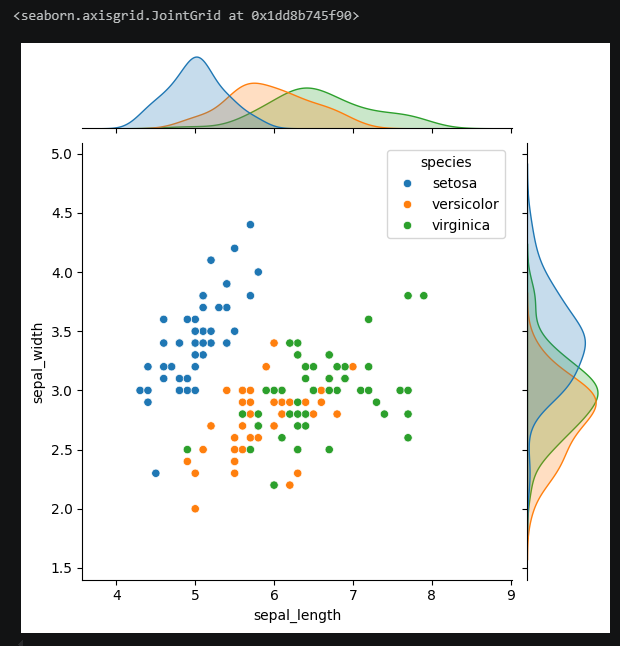
# 산점도와 분포를 동시에 확인
# 꽃받침 길이(sepal_length와 너비(sepal_width)의 관계를 종별로 구분
sns.jointplot(data = iris, x = 'sepal_length', y = 'sepal_width', hue = 'species')
# 산점도 그래프 회귀선 추가 (종별로 확인)
# 꽃잎의 길이와 너비의 상관관계를 선형 회귀선으로 표시
sns.lmplot( data = iris, x = 'petal_length', y = 'petal_width', hue = 'species' )

# 박스플롯
plt.figure(figsize=(20, 10))
sns.boxplot( data = iris, x = 'species', y = 'petal_width' )

# 바이올린 플롯 -> 데이터의 밀집도와 박스 확인
sns.violinplot(data = iris, x= 'species', y = 'sepal_length')

sns.pairplot(
data=iris,
hue = 'species',
diag_kind= 'hist'
)
